您现在的位置是:网站首页> 编程资料编程资料
ASP.NET MVC5网站开发用户登录、注销(五)_实用技巧_
 2023-05-24
295人已围观
2023-05-24
295人已围观
简介 ASP.NET MVC5网站开发用户登录、注销(五)_实用技巧_
本文实例为大家分享了ASP.NET MVC5网站开发用户登录、注销的具体方法,供大家参考,具体内容如下
一、创建ClaimsIdentity
ClaimsIdentity(委托基于声明的标识)是在ASP.NET Identity身份认证系统的登录时要用到,我们在UserService中来生成它。
1、打开IBLL项目InterfaceUserService接口,添加接口方法ClaimsIdentity CreateIdentity(User user, string authenticationType);
2、打开BLL项目的UserService类,添加CreateIdentity方法的实现代码
public ClaimsIdentity CreateIdentity(User user, string authenticationType) { ClaimsIdentity _identity = new ClaimsIdentity(DefaultAuthenticationTypes.ApplicationCookie); _identity.AddClaim(new Claim(ClaimTypes.Name, user.UserName)); _identity.AddClaim(new Claim(ClaimTypes.NameIdentifier, user.UserID.ToString())); _identity.AddClaim(new Claim("http://schemas.microsoft.com/accesscontrolservice/2010/07/claims/identityprovider", "ASP.NET Identity")); _identity.AddClaim(new Claim("DisplayName", user.DisplayName)); return _identity; }二、获取AuthenticationManager(认证管理器)
打开Ninesky.Web项目 Member区域的UserController,添加AuthenticationManager属性,在HttpContext.GetOwinContext()中获取这个属性。
#region 属性 private IAuthenticationManager AuthenticationManager { get { return HttpContext.GetOwinContext().Authentication; } } #endregion三、创建登录视图模型
Member区域的模型文件夹添加视图模型
using System.ComponentModel.DataAnnotations; namespace Ninesky.Web.Areas.Member.Models { /// /// 登录模型 /// /// 创建:2014.02.16 /// /// public class LoginViewModel { /// /// 用户名 /// [Required(ErrorMessage = "必填")] [StringLength(20, MinimumLength = 4, ErrorMessage = "{2}到{1}个字符")] [Display(Name = "用户名")] public string UserName { get; set; } /// /// 密码 /// [Required(ErrorMessage = "必填")] [Display(Name = "密码")] [StringLength(20, MinimumLength = 6, ErrorMessage = "{2}到{1}个字符")] [DataType(DataType.Password)] public string Password { get; set; } /// /// 记住我 /// [Display(Name = "记住我")] public bool RememberMe { get; set; } } } 四、创建登录页面
在UserCcontroller中添加(string returnUrl) action
////// 用户登录 /// /// 返回Url ///public ActionResult Login(string returnUrl) { return View(); }
右键添加强类型视图,模型为LoginViewModel
@model Ninesky.Web.Areas.Member.Models.LoginViewModel @{ ViewBag.Title = "会员登录"; } @using (Html.BeginForm()) { @Html.AntiForgeryToken() 会员登录
@Html.ValidationSummary(true) @Html.LabelFor(model => model.UserName, new { @class = "control-label col-md-2" }) @Html.EditorFor(model => model.UserName) @Html.ValidationMessageFor(model => model.UserName) @Html.LabelFor(model => model.Password, new { @class = "control-label col-md-2" }) @Html.EditorFor(model => model.Password) @Html.ValidationMessageFor(model => model.Password) @Html.LabelFor(model => model.RememberMe, new { @class = "control-label col-md-2" }) @Html.EditorFor(model => model.RememberMe) @Html.ValidationMessageFor(model => model.RememberMe) } @section Scripts { @Scripts.Render("~/bundles/jqueryval") } 效果

五、创建用户登录处理action
在UserCcontroller中添加 httppost类型的 Login action中先用ModelState.IsValid看模型验证是否通过,没通过直接返回,通过则检查用户密码是否正确。用户名密码正确用CreateIdentity方法创建标识,然后用SignOut方法清空Cookies,然后用SignIn登录。
[ValidateAntiForgeryToken] [HttpPost] public ActionResult Login(LoginViewModel loginViewModel) { if(ModelState.IsValid) { var _user = userService.Find(loginViewModel.UserName); if (_user == null) ModelState.AddModelError("UserName", "用户名不存在"); else if (_user.Password == Common.Security.Sha256(loginViewModel.Password)) { var _identity = userService.CreateIdentity(_user, DefaultAuthenticationTypes.ApplicationCookie); AuthenticationManager.SignOut(DefaultAuthenticationTypes.ApplicationCookie); AuthenticationManager.SignIn(new AuthenticationProperties() { IsPersistent = loginViewModel.RememberMe }, _identity); return RedirectToAction("Index", "Home"); } else ModelState.AddModelError("Password", "密码错误"); } return View(); } 六、修改用户注册代码
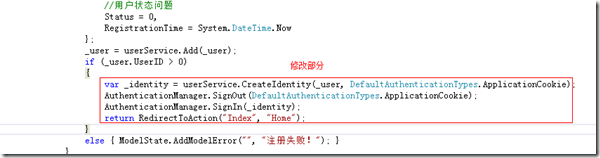
让用户注册成功后直接登录
七、注销
在UserCcontroller中添加在Logout action
////// 登出 /// ///public ActionResult Logout() { AuthenticationManager.SignOut(DefaultAuthenticationTypes.ApplicationCookie); return Redirect(Url.Content("~/")); }
本文已被整理到了《ASP.NET MVC网站开发教程》,欢迎大家学习阅读,更多内容还可以参考ASP.NET MVC5网站开发专题学习。
本文主要是用到了ClaimsIdentity(基于声明的标识)、AuthenticationManager的SignOut、SignIn方法。希望对大家实现用户注册和注销有所帮助。
相关内容
- ASP.NET MVC5网站开发用户注册(四)_实用技巧_
- ASP.NET MVC 5之邮件服务器与客户端_实用技巧_
- ASP.NET MVC5 网站开发框架模型、数据存储、业务逻辑(三)_实用技巧_
- ASP.NET MVC5网站开发项目框架(二)_实用技巧_
- 一个简单MVC5 + EF6示例分享_实用技巧_
- asp.net中GridView数据鼠标移入显示提示信息_实用技巧_
- ASP.NET MVC5网站开发概述(一)_实用技巧_
- ASP.NET MVC5实现文件上传与地址变化处理(5)_实用技巧_
- ASP.NET实现按拼音码模糊查询的方法_实用技巧_
- asp.net文件上传解决方案(图片上传、单文件上传、多文件上传、检查文件类型)_实用技巧_